
SignalPath Engineering Console
Chart Your Signal Path
Plan fiber routes, track strand usage, optimize loss budgets, and hand off cleaner circuit packages faster.
The hosted demo uses issued SignalPath credentials only. Database hostnames, users, and connection details stay hidden from viewers.
Fiber Builder Preview
Interactive Circuit Workspace
Builder Functions
Fiber Planning Stack
Circuit Design Preview
Main Equipment Room to Broadcast Rack
Selected Function
Strand Plan
6/24 active strands
Route
2,790 ft
Loss
1.5 dB
Slack
390 ft
Calculated Outputs
Fiber allocation
2,790 ft
1.5 dB
25%
18
Selected Output
Translates the selected signal services into active fiber pairs and spare capacity.
Topology
Point-to-point
Status
Build-ready
Strands
6/24
Optic
10GBASE-LR
Who It Is For
Built for teams that design, operate, and hand off fiber circuits
Fiber Circuit Builder is for the people who need circuit planning to stay connected to real infrastructure: rooms, racks, patch panels, trunks, optics, jumpers, labels, and field-ready documentation.
Broadcast and venue engineering
Teams responsible for moving video, data, control, RF, intercom, and production signals across complex facilities.
Systems integrators
Design-build teams that need a repeatable way to turn fiber intent into route details, materials, labels, and handoff documents.
Hospitals and healthcare campuses
Clinical technology, IT, facilities, security, and AV teams coordinating fiber across MDFs, IDFs, procedure spaces, public areas, and connected buildings.
Campus fiber and network teams
Groups managing strand capacity, patching, optical budgets, and change history across buildings, rooms, racks, and field cabinets.
Project managers and field leads
People who need clearer install packages, fewer assumptions, and a shared source of truth before work reaches the field.
Why It Is Needed
Fiber design breaks down when the route, loss, labels, and handoff are split apart
Fiber routes often live across drawings, spreadsheets, emails, and field notes.
Loss budgets, jumpers, strands, and labels are easy to separate from the actual circuit record.
Small connector, strand, or receiver mistakes can become expensive field rework.
A clean generated package saves engineering, estimating, install, and closeout time.
Fiber Circuit Builder Workflow
From rough path to field-ready circuit package
A single workflow for planning, design, tracking, optimization, and handoff instead of disconnected notes.
Plan
Define endpoints, pathway distance, topology, fiber type, and signal services.
Design
Shape the circuit around strand count, connectors, optics, slack, and route style.
Track
Keep labels, endpoints, service loads, and active or spare strands connected.
Optimize
Compare capacity, loss budget, topology, and fiber mode before decisions lock.
Handoff
Package the route, materials, notes, and labels for review or field coordination.
Actual Builder Screens
See what the Fiber Circuit Builder produces
Click an output to see the actual builder screen behind it. The screenshot is the proof, and the notes call out what that part of the software gives the planning and field team.
Venue backbone
Path Preview
Shows the proposed circuit path as a working route with hardware, patch panels, bulkheads, cable legs, splice events, jumper points, and endpoint detail.
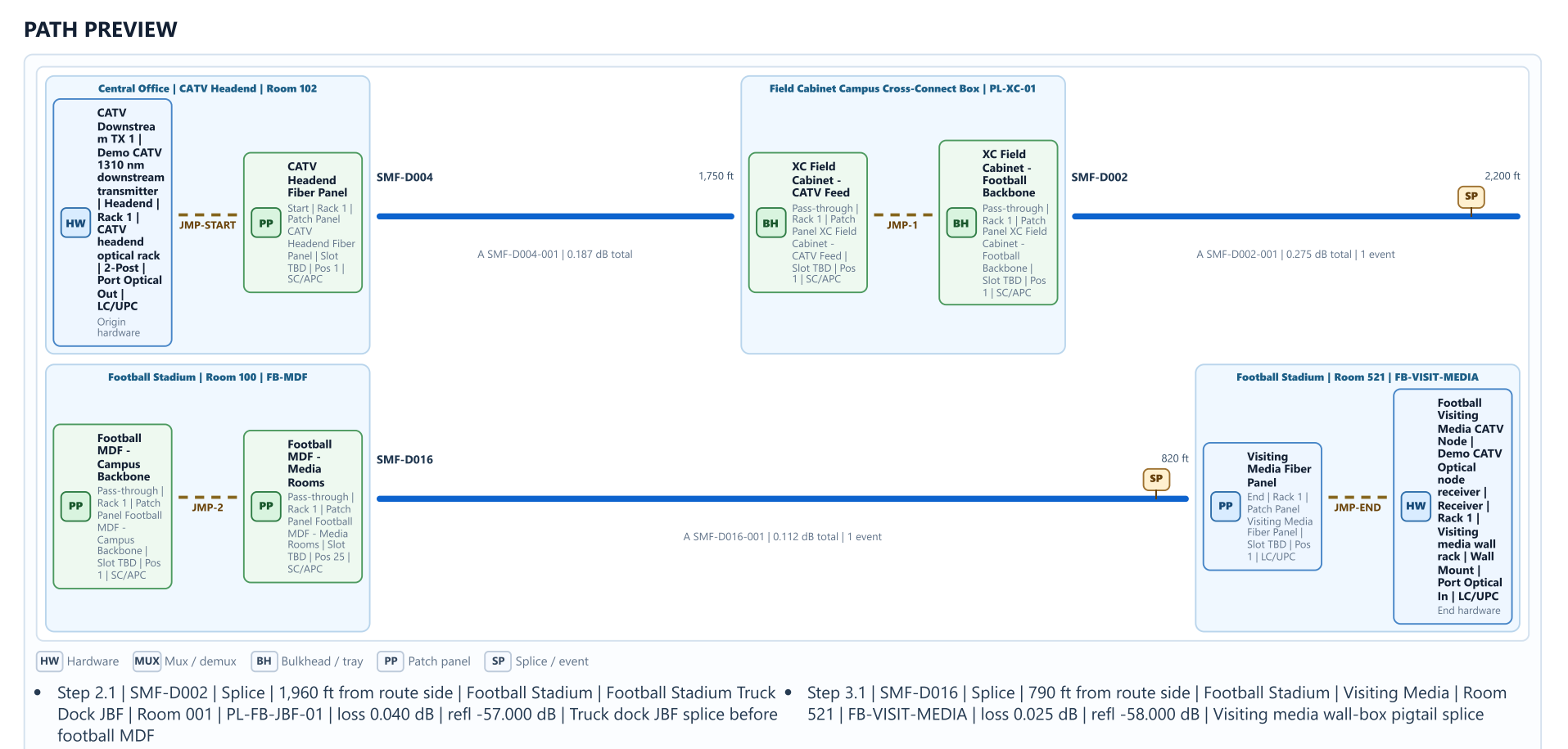
What this screen proves
SP-VENUE-BACKBONEWhy it matters
Demo Access
Use issued demo credentials instead of open public access
The website can invite qualified viewers into the hosted demo while keeping database hostnames, internal users, and infrastructure details out of the browser. Visitors only need an issued SignalPath demo username and password.
Request demo credentials
Visitors request access first, then SignalPath issues one or more controlled demo logins instead of allowing anonymous public access.
Open the hosted demo
Approved viewers use the demo link with a simple username and password to see rooms, racks, patch panels, trunks, hardware, circuits, and generated build outputs.
Walk through one circuit
Start with endpoints, choose a route, review the path preview, inspect losses, then generate jumpers, labels, and a cut sheet.
Demo Security
Demo credentials issued by SignalPath, not anonymous public access.
Demo URL can be visible, but the application still requires a valid login.
Dedicated demo tenant, separate from production customer environments.
No customer production database connection.
Sample or redacted data only, with customer names and real IPs removed.
Login required, with account-specific demo credentials that can be rotated or removed.
Role-based demo permissions so viewers cannot edit or export beyond the intended flow.
Friendly environment label only; hide database usernames, hosts, tenant IDs, and database names from the UI.
Use a least-privilege demo database user, never the master database account.
HTTPS everywhere and no database credentials or secrets exposed in the browser.
Access logging so demo usage can be reviewed after each session.
Path Definition
Circuit Inputs
Transport Configuration
Topology and Services
Fiber Type
Topology
Signals Carried
Builder Highlights
Everything the Builder Produces
Selected Builder Function
Strand Plan
Translates the selected signal services into active fiber pairs and spare capacity.
Output Matrix
Build-readyReview Notes
Build-readyFiber type, distance, strand capacity, and topology are aligned.
6 active strands with 18 spare strands reserved.
The draft build package is ready for review and handoff.
Generated Engineering Plan
Venue backbone
Route + slack
2,790 ft
Estimated loss
1.5 dB
Utilization
25%
Recommended Build
24-strand Singlemode OS2 fiber with LC termination.
10GBASE-LR optics for 10G service across 2,790 ft.
390 ft of planned service slack across endpoints and route transitions.
Material Allowance
1 patch panel position set.
1 rack unit allowance for fiber management.
2 splice or transition points in the draft pathway.
Path
Main Equipment Room to Broadcast Rack
Service Set
Data, Video, Control
Capacity
6 active strands, 18 spare strands.
Label Prefix
SP-VENUE-BACKBONE